

If you love playing Animal Crossing: New Horizons, you probably have lots of items—furniture, tools, flowers, and more. Running out of space to keep them can be frustrating! But with updates like 1.6, 2.0, and 3.0, Nintendo added helpful storage expansions. This guide will focus on ACNH Item Storage Expansion, including levels, costs, maximum capacity, how to unlock it, and fast ways to earn Bells for upgrades.
ACNH 3.0 Storage Expansion & Upgrade Guide
In ACNH, you have two key types of storage to manage:
Pocket Inventory: This is the limited space you carry with you at all times. It fills up fast with crafting materials, creatures, and tools.
House Storage: This is the larger space accessible only from inside your home (use the Right button on the D-Pad). It starts small but grows significantly as you upgrade your house and unlock bonus expansions.
Both types of storage can be expanded as you progress in the game, but house storage becomes your main go-to for long-term item keeping.
Over the years, ACNH has updated what you can store:
Before the 2.0 update, you couldn’t store DIY recipes.
Before the 3.0 update, you couldn’t store flowers and plants.
Now, with 3.0, you can even store trees, bushes, and other similar Animal Crossing items!
ACNH House Storage Expansion & Upgrade Levels
Storage expansion happens in two main phases: initial upgrades tied to home expansions (when you first expand your house by adding rooms) and bonus upgrades (unlocked after your house is fully expanded, via game updates).
Initial Storage Upgrades (Tied to Home Expansions)
Early in your ACNH journey, your house storage grows automatically as you pay off Tom Nook’s loans to expand your home. These upgrades add more rooms to your house and increase your storage slots at the same time. This is how your storage starts and grows with your home:
| Home Upgrade Stage | Total Storage Capacity | Expansion Cost (Bell) | Slots Added | Key Notes |
|---|---|---|---|---|
| Upgrade to House | 80 items | N/A (initial home) | N/A | Your first house comes with 80 storage slots by default. |
| Ground Floor Expansion | 120 items | 98,000 Bells | +40 | Expanding your starter house adds 40 extra slots. |
| Back Room Addition | 240 items | 198,000 Bells | +120 | Adding a back room gives a big boost of 120 slots. |
| Left Room Addition | 320 items | 348,000 Bells | +80 | Unlocking the left room adds 80 more slots. |
| Right Room Addition | 400 items | 548,000 Bells | +80 | Adding the right room brings another 80 slots. |
| Second Floor | 800 items | 758,000 Bells | +400 | The second floor upgrade doubles your storage from 400 to 800 slots. |
| Basement | 1,600 items | 1,248,000 Bells | +800 | The final home expansion (basement) gives the largest initial boost—800 extra slots. |
Bonus Storage Upgrades (After Full Home Expansion)
Once you’ve paid off the loan for the Basement (the last home expansion), you’re eligible for bonus storage upgrades. These were added in later game updates (1.6, 2.0, and 3.0) and let you expand storage far beyond the initial 1,600 slots.
| Storage Expansion Levels | Total Storage Capacity | Expansion Cost (Bell) | Slots Added | Key Notes |
|---|---|---|---|---|
| Storage Expansion 1 (1.6) | 2,400 items | 500,000 | +800 | First post-home expansion upgrade—adds 800 slots to the basement’s 1,600. |
| Storage Expansion 2 (2.0) | 3,200 items | 700,000 | +800 | Continues the 800-slot increase from the first bonus. |
| Storage Expansion 3 (2.0) | 4,000 items | 900,000 | +800 | Another 800-slot boost, keeping the steady growth. |
| Storage Expansion 4 (2.0) | 5,000 items | 1,200,000 | +1,000 | Jumps to a 1,000-slot increase (the first big jump in bonus upgrades). |
| Storage Expansion 5 (3.0) | 7,000 items | 1,500,000 | +2,000 | 3.0 update brings a massive 2,000-slot boost—great for storing large items like trees. |
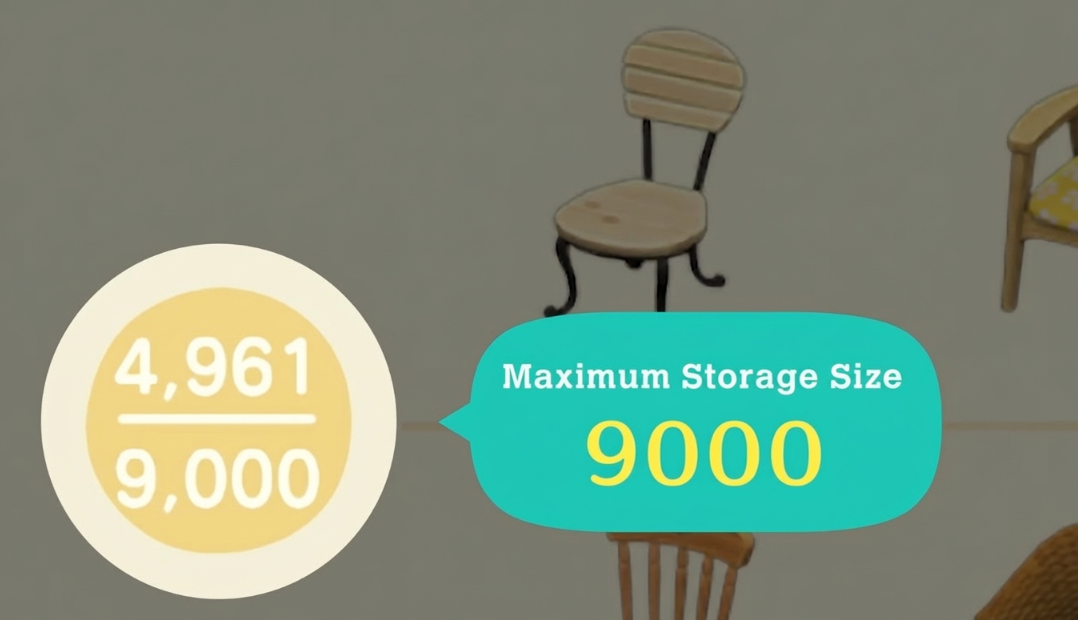
| Storage Expansion 6 (3.0) | 9,000 items | 1,800,000 | +2,000 | The final storage upgrade! Adds another 2,000 slots for a max capacity of 9,000 items. |
Key Notes About All Expansions
Payment Rule: For every upgrade (initial and bonus), you must pay the full Bell amount upfront. You can’t split payments—make sure you have all the Bells in your pocket (not in the bank) before talking to Tom Nook.
3.0 Update Perk: The fifth and sixth bonus upgrades (7,000 and 9,000 items) come with the 3.0 update, which also lets you store bushes, trees, and other previously unstoreable plants. This makes the final upgrades extra useful for keeping your island tidy while holding seasonal or large items.
Progression Check: If you already fully expanded your home (including the basement) before updating to 1.6, 2.0, or 3.0, Tom Nook will notify you about the new bonus upgrades when you next visit Resident Services. You don’t have to do extra tasks—just pay the Bells to unlock them.
How to Unlock Max Storage Expansions in ACNH 3.0?
Step 1: Unlock Initial Storage (Tied to Home Expansions)
1. Start with your initial house (80 storage slots).
2. Talk to Tom Nook at Resident Services and choose to expand your home.
3. Pay the required Bell cost for each home upgrade (e.g., 98,000 Bells for the first expansion).
4. Wait one day for the home expansion to finish—your storage will automatically increase when the work is done.
5. Repeat this until you unlock the Basement (1,600 storage slots) by paying the 1,248,000 Bell loan.
Step 2: Unlock Bonus Storage Upgrades (After Basement)
1. Ensure your game is updated to the required version (1.6 for the first bonus, 2.0 for the next three, 3.0 for the final two).
2. Visit Resident Services and talk to Tom Nook.
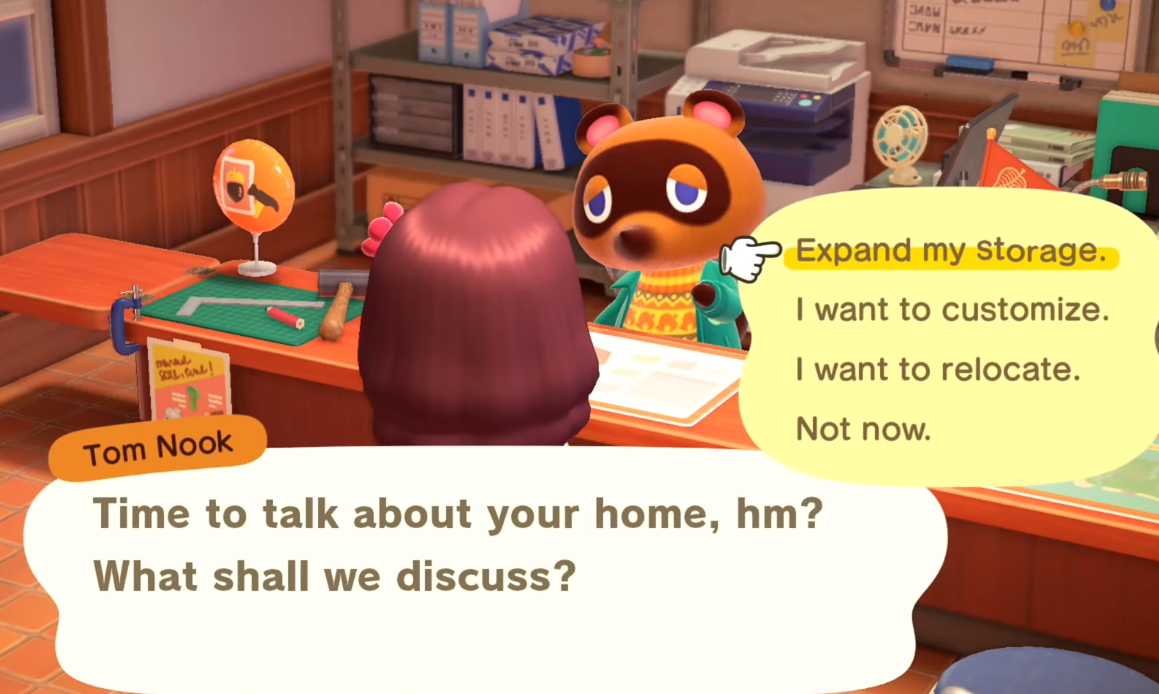
3. Select “About my home” from the conversation options.
4. Choose “Expand my storage” (this option only appears if your home is fully expanded with the basement).
5. Pay the full Bell cost for the bonus upgrade (e.g., 500,000 Bells for the first bonus).
6. Wait one day—your storage capacity will increase the next morning.
7. Repeat steps 2–6 for each bonus upgrade until you reach 9,000 items (the sixth bonus upgrade).
Step 3: Confirm Max Storage
You’ll know you’ve hit the max storage (9,000 items) when Tom Nook tells you he can’t expand your storage any further. There are no more upgrades after the sixth bonus level—you’ve unlocked the full potential of ACNH’s storage system!
ACNH 3.0 Bell Farming for Storage Upgrades
Storage upgrades (especially the bonus ones) cost a lot of AC Bells—from 500,000 Bells for the first bonus to 1,800,000 for the final one. Here are the best, easiest ways to earn Bells quickly in ACNH 2026:
1. Money Rocks (Easy Daily Bells)
Every day, one rock on your island is a money rock. Hit it with a shovel 8 times (stand close to avoid moving back) to collect 16,100 Bells.
Make a “rock garden” by clearing space around your island’s rocks—this makes it easier to hit them all without obstruction.
Bonus: Talk to Katrina (the fortune-teller) for a money luck day. On these days, the money rock drops 32,000 Bells instead of 16,100!
2. Money Trees (Triple Your Bells)
Each day, a glowing gold spot appears on your island. Dig it up to find Bells, then bury 10,000 Bells back in the spot.
After 3 days, a money tree grows with 30,000 Bells (triple your investment). Never bury more than 10,000—you won’t get extra returns.
3. Non-Native Fruit (Steady Income)
Your island has a native fruit (e.g., apples, pears) that sells for 100 Bells each. Non-native fruit (from mystery islands) sells for 500 Bells each.
Use Nook Miles Tickets to visit mystery islands, collect non-native fruit, and plant an orchard on your island. Harvest and sell the fruit regularly for steady Bells.
Bonus: Sell your native fruit on friends’ islands (where it’s non-native) for 500 Bells each.
4. Fossils (Daily High-Value Items)
Four fossils spawn on your island daily. If you miss a day, 5 spawn the next, and 6 the day after (capped at 6).
Dig up fossils, take them to Blathers at the Museum to identify them, and sell duplicates—most fossils are worth 1,000+ Bells each.
5. Hot Items at Nook’s Cranny (Double Profit)
Outside Nook’s Cranny, a sign lists two “hot items” daily. These craftable items sell for double their normal price.
The best hot item is the Donation Box: Put Bells inside, then sell it to Timmy and Tommy. They’ll pay double the Bells you inserted plus the box’s value (e.g., 99,000 Bells in = 198,000 Bells back).
6. Fishing, Bug Catching, and Diving
Diving for sea creatures is the most profitable (some sell for 10,000+ Bells), but fishing and bug catching work too.
Wait for Flick (bug collector) or CJ (fish collector) to visit—they buy bugs/fish for 1.5x the normal price. Sell sea creatures right away (no special buyer for them).
7. Turnips (Risky but Lucrative)
Buy turnips from Daisy Mae (Sundays morning) and sell them to Timmy and Tommy during the week. Prices change twice daily—check often.
Ask friends for their turnip prices or use online communities (like Turnip Exchange) to find high-price islands. A good price can net you millions of Bells.